Adding Duranium Plating
The workflows we can now execute will usually be triggered by api calls from the outside and call other services in return, even 3rd party ones. With so many computers talking to each other, through the internet no less, it's inevitable that something will go wrong at some point. Network issues, services being down, bugs, you name it. And of course, our own servers crashing and loosing state.
What can we do to guard against such failures? We could build our own retry logic, do checkpoints, persist state somewhere, but that sounds like a lot of work.
Instead, all those problems are neatly solved by a new-ish class of solutions called Durable Execution (Engines).
My personal preference for durable execution right now is Restate. It's open source and can run completely locally with just one command in your project folder. The SDK is pretty nice and the core concepts are well thought out. It's also getting developed very actively by a great team.
INFO
Most solutions in this space have the same value proposition and differ mostly in API and implementation details. Temporal, Inngest and DBOS use existing database technologies like Postgres, Cassandra or Redis, while Restate implements their own log storage based on RocksDB.
If you want to learn how to use Restate yourself or learn how it works in detail, check out their docs. I'll just cover some concepts that are relevant for how I'm using it in this project.
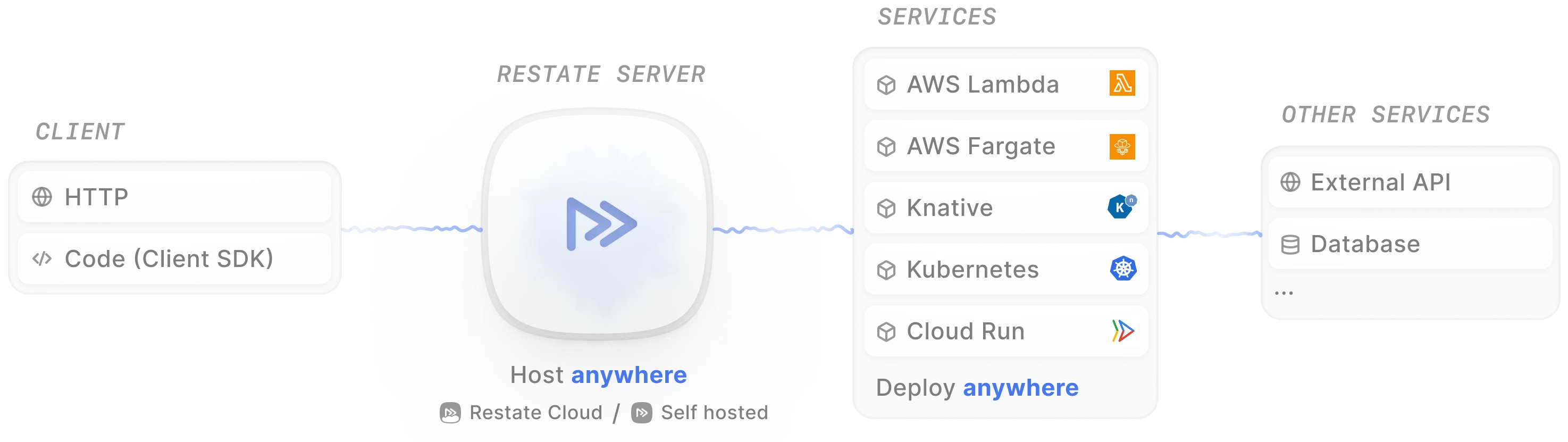
Restate acts as an intermediary between the outside world (or other parts of your system) and your own code (what they call "services"). Restate offers an http api to invoke services, called "ingress". You can optionally also use their client SDKs. Restate first records the request durably so it'll never get lost, then invokes your service, which you still run/host yourself, ideally via HTTP/2.
Setting up Restate
Installing a Restate server for development is super easy, it's just a npm package (which contains their standalone binary)!
With npm i @restatedev/restate-server you get a local Restate server that persists data to ./restate-data by default.
I've added a npm script to the root package.json
"scripts": {
	…
	"restate-server": "npx @restatedev/restate-server --config-file restate.toml"
}
and wired it up as a task dependency for dev with turbo in the execution-backend:
"tasks": {
	"dev": {
		"persistent": true,
		"with": ["//#mongodb", "//#restate-server"]
	}
}
Now when I run npm run dev it also starts the Restate server automatically.
INFO
For a resilient production setup you'll want to run multiple Restate nodes in a cluster to prevent data loss. Check out their docs on high availability for more.
Creating our Service
Creating a Restate service is also pretty straightforward. I'm choosing Node.js to run my services, but Restate also offers SDKs for Python, Go, Java/Kotlin and of course Rust (Restate is written in Rust after all and their SDKs all wrap a shared Rust core).
I already added code for starting a http/2 server with restate when I set up the project:
import * as restate from '@restatedev/restate-sdk'

const port = await restate.serve({
	services: []
})

console.log(`Execution Backend running on http://localhost:${port}`)
WARNING
Restate also has a concept called "workflows", which is different from our own workflows. Our workflows are also restate workflows, but not the other way around. Read more about Restate workflows here.
From there it's just a matter of transplanting our earlier, temporary /execute/:workflowId code from the editor-backend into a new Restate service. I'm going to use Restate's workflow concept here, which is a special kind of service that has state and an id to guarantee exactly-once execution, with nice lifecycle management on top. I'll want all that in the future.
restate.workflow({
	name: 'Workflow',
	handlers: {
		async run (_ctx: restate.WorkflowContext, { workflowId, payload }) {
			const core = await fs.readFile(`${STORAGE_BASE_PATH}/workflows/${workflowId}/workflow.core.wasm`)
			await runWorkflow(core, payload)
		}
	}
})
With my Restate workflow set up in execution-backend I now need to register it with the Restate server. Locally, I'm just using their CLI for that:
npx @restatedev/restate -e local deployments register http://localhost:9080
Deployment ID:  dp_15f5WJY9Z7lSJxpwZcdFIJz

❯ SERVICES THAT WILL BE ADDED:
  - Workflow
    Type: Workflow 📝
     HANDLER  INPUT             OUTPUT
     run      application/json  application/json
Each service deployment is always associated with a single url, so if we want to scale, we need to add our own load balancer in front of multiple instances of our execution-backend server. Locally, we can also use nodejs' built-in cluster module.
We can now start a new workflow execution by calling the Restate server's http api:
curl http://localhost:8080/Workflow/%2F$(date +"%Y%m%d%H%M%S")/run --json '{"workflowId": "my-first-workflow"}' -vThe url is a bit clunky since we need to provide a unique Restate workflow id and pass our workflow id in the payload. Let's wrap that in a simple service to generate the Restate workflow id and then wrap that in a simple hono server (without Restate) for a pretty user-facing API. In a production setup, that outermost server would be an API gateway or proxy.
Restate has a client SDK that wraps the ingress API, so let's use that. Since I'm not interested in the return value of the workflow execution and don't want the API to block until it's finished, I'll use Restate's sendClient which returns as soon as an invocation is submitted.
restateClient.serviceSendClient<typeof workflowWrapperService>(workflowWrapperService).execute({ workflowId, payload })With a bit more glue code and after re-registering our services with the Restate server, we can now start workflow executions on a prettier endpoint!
curl http://localhost:8888/my-first-workflow/execute -H 'content-type: application/json' -d '{"test": 1}'Restate's Durable Execution
What happens if something goes wrong during the execution of your code?
The short answer is: Restate runs your code again from the start. Writing to a database twice just because something else failed later is of course bad, so we as writers of code need to tell Restate when something is a side effect so Restate can record the result and return it directly instead of re-running the side effect.
In JS you usually do that by wrapping the side effect in a ctx.run call.
We also need to make sure to remove all non-determinism from our code, so instead of Math.random() or Date.now(), we use APIs provided by the Restate SDK.
For more, see the docs on durable steps.
Right now the wasm sandbox does not properly record fetch calls as side effects. I'm not going to do that in this iteration though, since next I'll be changing the whole host API anyways.
Endless Loops
You can build endless retry loops in Restate! By just doing throw new Error('lol') for example. Restate has the concept of terminal errors to signal unrecoverable failures.
A note about HTTP/1 vs HTTP/2
While Restate also works with services hosted on a server (or a serverless offering) that only speaks HTTP/1, like AWS Lambda, I would strongly recommend using HTTP/2 for your services if possible, especially if your services have any side effects at all.
With HTTP/2, Restate sends log entries and does calls to other services over a single long-lived connection, so your code ideally runs all the way through in one go.
With HTTP/1 hovewer, Restate only does single request/response roundtrips and the first new event to log interrupts the current execution to report back to the Restate server. It then calls your service again with the updated log, replaying until it reaches the next side effect. That means that your code will be executed N times for N side effects, which for AWS Lambdas for example is an extreme overhead. If you just do one CPU-heavy task without ctx.run calls, that's fine, for everything else, try to use HTTP/2.